


Category: Instructional Design
One of the unique features of my Learning to Performance System is that it integrates work process and tools redesign into instructional design and course development .
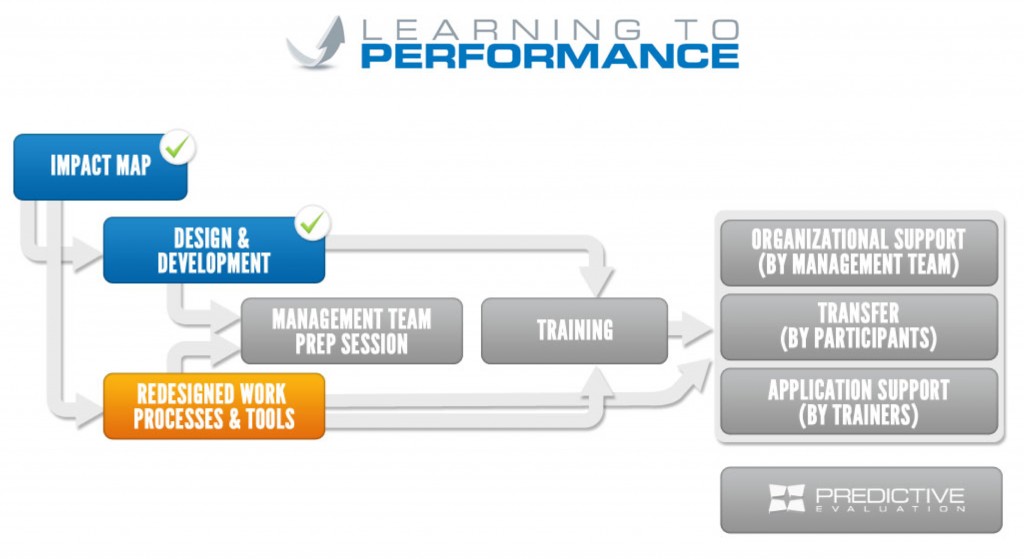
Before I discuss the specifics, let’s talk about a real case where this was applied. One of my clients had five task teams operating inconsistently with respect to Project Management (PM). While these teams were tightly aligned to the company’s overall business strategy , they were each operating in a vacuum, with no commonality. The company needed to implement basic project management across all teams, striving to institutionalize common PM processes, methods and templates.
The client and I discussed that implementing project management training without redesigning the project management process, tools, and templates would result in little transfer . Therefore, simultaneously with instructional design and development, I created the firm’s new standard project management process, developed five standard PM templates, and identified the on-line PM system the company would use. These were approved by the executive team and the training was designed to totally support the project management initiative.
This shows the potential power of integrating process/tool redesign with instruction design. See below on the steps I use in this phase.

While there are many process redesign models , I prefer to use this simple model:
Step 1: As part of my instructional needs analysis and environmental scan I identify any process, tools, or systems that may be possible redesign candidates and present them to the client for consideration and move forward with redesign. Note: at times, the reward and recognition practices need to be examined to ensure use of new training skills is supported. The client may say no to redesign but should know the consequences to post-training transfer and performance.
Step 2: If the client chooses redesign, then the processes are mapped as-is. Note: if you are not qualified for this effort, then engage a process-mapping expert on content and exercises that the instructional design will need to address.The first step is to identify roles within the process.
- Identify process steps needed to complete the work.
- Identify information passed from step to step within the process.
- Identify decision points within the process that could change direction or require additional steps.
- Document the process flow by creating a diagram showing each step, the role that performs the step, and information flowing from step to step.
Step 3: Using the as-is process and the Impact Map , you next design the to-be process all along noting content and tasks that training will need to address. I use an iterative adaptation of the fishbone or Ishikawa diagram commonly used for root cause analysis. Essentially the use of the fishbone is expanded to not only determine root cause, but also to identify improvement opportunities.
The iterative adaptation is described below.

Primary Users
- Are job descriptions correct? Do they need updating?
- How are the skills, knowledge, and beliefs from the Impact Map addressed with the users? How will training aid in the new process?
- Are the business decisions assigned to users at the appropriate organization level?
- Is the primary user inhibited due to the work environment?
Management Control
- What levels of management control are used within the new process?
Workflow Tasks
- What tasks are needed to perform the process?
- How are they different?
- What is the work process flow?
System Interaction
- What systems will the users employ to do the work?
- Does a system currently exist that is sufficient?
- What system changes will be needed?
Information Flow
- What information is needed to accomplish each task?
- Is information stored appropriately per company requirements?
- Are there opportunities to gain efficiencies by automating?
- Are there possibilities of implementing new or enhanced tools to the primary user?
- Are adequate leading metrics established within the process to allow the process owner to investigate task performance in order to affect final results?
- Are adequate lagging metrics established at the end of the process to allow for trend analysis of the final result?
Business Decisions
- Are the current business decisions based on valid business rules?
- Can business rules be changed to allow opportunities for efficiencies?
Step 4: While the course is being defined, the new/enhanced process and/or tools are tested and implemented.
By doing this activity you greatly enhance the likelihood of what you train being successfully transfer to the job.
As always, I look forward to your thoughts on this approach.
The third step in the Learning to Performance System is to begin instructional design and course development . The output of the second step, the Impact Map , is considered for this activity. The purpose of this task is to take the first column of the map and seamlessly turn it into training .
I use the ADDIE model for my design and development efforts . The ADDIE Model is a generic term for the five-phase instructional design model consisting of Analysis, Design, Development, Implementation, and Evaluation. Each step has an outcome that feeds into the next step in the sequence.
ASTD Learning and Development Blog - April 16, 2012 – “Learning Bursts and Business Acumen Training: A Case Study”. Ran my article on how Powers Resourse Center successfully used the Learning Burst training methodology with one of their clients. Click here to read the article.
Many thanks to Dr. Phil Young and Tara Powers for their inventive approach to using Learning Bursts.

If you would like to learning more about the Learning Burst training method, you can watch my webinar on demand Introducing Learning Bursts: A Different Way to Deliver Training .
Chief Learning Officer Newsletter published an article on my Learning Burst approach in their March 14, 2012 issue titled Short is Sweet in Learning . In it I discuss the concept of learning bursts and the benefits of the approach. The writer uses the term microlearning which is a nice way of describing the approach. I especially like the way he wove in analogy to a box of chocolates.
Case studies are descriptions of a real life experience, related to the content in Learning Burst training , which are used to make points, raise issues or otherwise enhance the participants’ understanding and learning experience. The account usually follows a realistic scenario, such as a management or technical problem, from start to finish. Because they provide practical examples of problems and solutions, challenges and strategies, they support more theoretical material and often make the “lesson” more memorable and believable for the class.

Simulations in Learning Burst training are simplified versions of reality; they place participants in realistic business environments where they are asked to complete tasks with legitimate business goals. They capture the essentials of a workplace environment in a way that allows participants to apply new skills, try different approaches and explore the implications of decisions and actions risk free.
A Learning Burst is made up of 2 components: the audio cast and the accompanying workbook. The workbook completes the learning burst content and adds to the topics taught in the audio segment.

Last week I shared the first two steps to create training using the Learning Burst method. Here are the next two steps.
 Step 3: Develop the design document for a Learning Burst course.
The instructional design document provides detailed instructions on how to build the Learning Burst course, but it doesn’t contain any actual course content; it’s similar to an architect’s blueprint or a software engineer’s design document. The instructional design document will perform the following tasks:
Step 3: Develop the design document for a Learning Burst course.
The instructional design document provides detailed instructions on how to build the Learning Burst course, but it doesn’t contain any actual course content; it’s similar to an architect’s blueprint or a software engineer’s design document. The instructional design document will perform the following tasks:
Over the past few weeks I have been posting about the Learning Burst method. In today’s post I share the first 2 steps I use to create Learning Bursts. Additional steps to follow in the next few weeks.
 Step1: Determine if content is appropriate for a Learning Burst.
Consider what skills you are training, and how you want your employees to use those skills in their jobs. Answer the questions below and decide if you have a candidate for Learning Bursts.
Step1: Determine if content is appropriate for a Learning Burst.
Consider what skills you are training, and how you want your employees to use those skills in their jobs. Answer the questions below and decide if you have a candidate for Learning Bursts.
- How many employees need to be trained? How quickly? Learning Burst work well with larger number of employees so that he savings are realized. However, I have done sessions with 5-10 people and it works well.
- What is the geographic distribution of the participants? Learning Bursts work well when the participants are spread over many geographic areas.
- Can Learning Bursts be used in conjunction with the face-to-face training you currently use? This method works very well to provide participants with foundational knowledge of concepts – this reduces face-to-face time or allows more time for application practice.
- Is the culture ready to make Learning Bursts a success? If your culture already is or is ready to use alternate forms of training then Learning Bursts have a chance of success. If not, you may not want to use Learning Bursts.
- Can the content be broken in small independent pieces? Each Learning Burst has a target length of 20 minutes (listening to the audio and completing the workbook). This lends itself to each burst being a single topic or concept. If your training content can be broken down into small, single topic segments, then it is a good Learning Burst course.
The Learning Burst method goes beyond standard training expectations and provides something “more” while adding little or nothing to its cost. Learning Bursts deliver a teaching approach that is practical, simple, and to the point instead of the more traditional courses delivered either in classrooms or online. It is a teaching vehicle that is tailored to the changing work styles and learning behavior of today’s employees in a cost-effective, individually customized, and company-focused manner.
So what are some of the ways that companies are using Learning Bursts?