


Category: Learning to Performance
Frequently I share best practices in the training and development field. Those of you have a read my posts previously know that I believe in a Learning to Performance approach . Here is a recent success in using this approach with one of my clients.
My client and their business issue. I was approached by the VP of HR for a very successful 100 year old global manufacturing firm. As we talked, I found out that a component of their 2012 business plan had teams working on five strategic initiatives. Early in the year, five task teams were operating with differing levels of consistency with respect to project management and milestones were being missed. The CEO, President, and the VP of HR realized that the company needed to implement basic project management (PM) across all five teams with the desire to institutionalize common PM processes and templates for future teams and institutionalize a common method for project management. Hence the call to me – “Can you help us?”
The solution. I recognized immediately that this opportunity was tailor made for the Learning to Performance approach . And so we began.
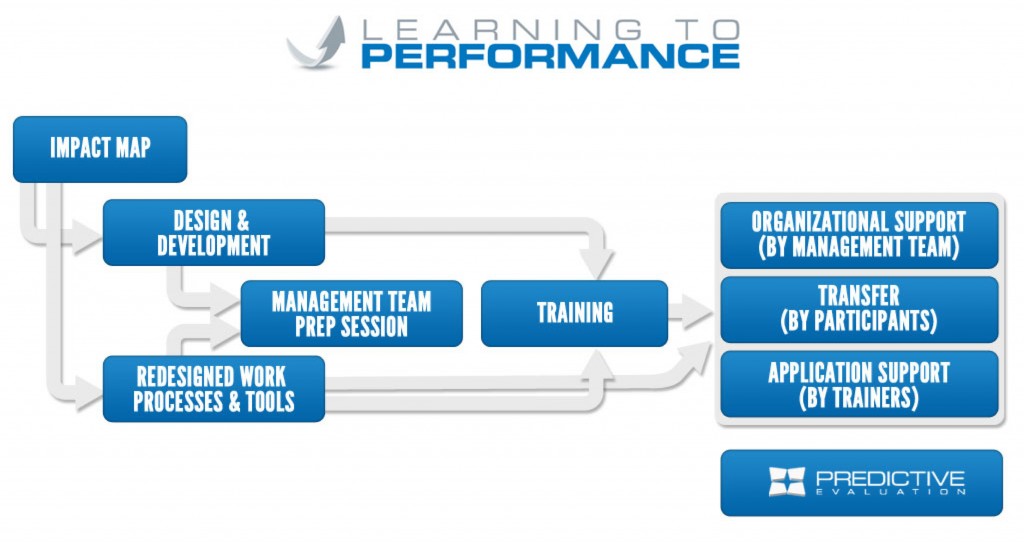
Step 1 – The Impact Map. First I formed a Steering Committee of the CEO, President, VP of HR, Training Manager, and myself who created a simple Impact Map that documented the project management skills, knowledge, and on-the-job behaviors:

Step 2 – Redesigned Work Processes & Tools . Before beginning instructional design, I created and proposed a simple project management process that all teams would follow. The trick here is to absolutely ensure that the process meets the needs of the company so that the process reflects the real work to be dome. To accomplish this, I performed an analysis of the firm’s project management level of maturity, skill & experience of the target audience, profile of the target audience in terms of skill, and provided simple but effective tools and templates to enable the process. After several meetings, the Steering Committee agreed upon the following process:

We also agreed to use an on-line project management collaboration tool called Smartsheet as the software for all project teams. To meet the need of a consistent use of tools, I created a standard project management template in Smartsheet with 3 standard documents that are required via the process. One incredible thing was that the President took ownership and reviewed, modified, and finally approved the Smartsheet template and documents. What a cool thing for a President to do!
Step 3 – Design & Development . With the Impact Map, tools, and process in place, it was easy to design and develop a 2-day hands-on workshop. I built the design so that participants were required to have an assigned company project that they would use during the workshop. 70% of workshop time was applying the process and using the tools as they mastered their new project management skills.

Step 4 – Management Prep Team Session . With all of the elements in place, I conducted a 4-hour management prep team session. In this session, 16 executives attended (all the CEO and President’s direct reports). In the session, I taught then we discussed:
- The project management workshop
- Project management principles & processes
- How to make project management work and be an executive sponsor
- Meeting with your employee before and after the workshop Providing post-workshop support
After this session, I met with the Steering Committee to talk about next steps. There I voiced that one of my concerns was that the firm was missing an Officer of Project Management to own and oversee the process. Without this piece we would have less than predicted transfer (performance on the job). The Steering Committee embraced the idea and a few weeks later I was informed that the VP of Operations was promoted to the Director of Project Management for the company. From that moment on the two of us worked together to make the rest of the Learning to Performance approach work. I also became his personal coach with respect to PM.
Step 5 – Training . 18 employees were selected to attend the workshop which included the new Director of Project Management. The design worked flawlessly. To aid in transfer to the job, the workshop incorporated 4 journaling points and a final action-planning module. The action plans were captured on-line via Survey Monkey while still in class. The next day, the action plans were sent via email to the participants and their managers thus facilitating a post-workshop conversation. The action plans were also sent to the VPs of HR and Project Management – participants were informed that this would be happening and were encouraged to write solid plans of action.
Step 6 – Organizational Support by the Management Team. All participants met with their managers within one week of the workshop to finalize their action plans and go over their projects. Participants then applied the process and used the Smartsheet collaboration tool and the standard templates to get their tasks done all while being overseen by the executive team and the Director of Project Management.
Step 7 – Transfer by Participants . The participants applied the project management process, tools, and templates while performing the project tasks. An enabling factor of the successful transfer was the collaboration function of Smartsheet. Participant work was immediately available and shared daily to their sponsors, project teams, Director of Project Management, and myself.
Step 8 – Application Support by Trainers (me). I was contracted to support each participant in the 60 days that followed the workshop. What I did was meet with each participant one-on-one for 1 hour at 30 and 60 days after the workshop. At the 30-day meeting we discussed their action plan and where they were with it. As needed, I then coached them on how to perform the work. In some cases the participant was doing so well that I provided advanced project management skills and showed additional features of Smartsheet. At the 60 day mark I reviewed there progress and talked about how they would use their new PM skills beyond their initial project.
I also met regularly with the Director of Project Management (at 30 and 60 days) and other times to coach him as he settled into his new role. As I talked to the Steering Committee during this time, one thing that they mentioned to me was that when participants knew I was coming at 30 and 60 days they sharpened their game so as not be embarrassed. Just the act of formal follow-up aided in successful Learning to Performance.
Step 9 – Predictive Evaluation . So did the company realize the results it had predicted in its Impact Map? The results are: Intention Evaluation : 100% of the action plans were judged as acceptable (employees are planning to do the things the firm required). Adoption Evaluation : Did we get the desired transfer (performance)? Absolutely! 17 out of the 18 participants had successfully transferred the predict behaviors documented in the Impact Map. That is a 94% transfer rate – an extraordinary adoption! Impact Evaluation : Here are the company’s results now versus industry standard (1) Performance Management results.

Thank you for reading and as always, I invite your comments and thoughts.
(1) Source: The Standish Group
Training only provides capability to employees – the opportunity to try and master learned skills is where performance really happens. For me, the element that is most crucial in the Learning to Performance system is organizational support by management.

There are numerous methods by which the management team can support learned skills and turn them into successful performance. Today, I offer a few techniques that work in most environments and with any type of learned skill.
 Tip 1: Post-program teleconference/web meeting with managers.
Once participants have graduated from the
training
program, consider holding a post program teleconference with their managers. The objectives of this meeting are: (1) to educate and inform management of the new skills that have been acquired by their employees in training, (2) describe the on-the-job behaviors that were identified in the
Impact Map
and designed into the learning experience, and (3) provide management the tools and techniques they can use to fully support their employees as they try out the new skills on the job.
Tip 1: Post-program teleconference/web meeting with managers.
Once participants have graduated from the
training
program, consider holding a post program teleconference with their managers. The objectives of this meeting are: (1) to educate and inform management of the new skills that have been acquired by their employees in training, (2) describe the on-the-job behaviors that were identified in the
Impact Map
and designed into the learning experience, and (3) provide management the tools and techniques they can use to fully support their employees as they try out the new skills on the job.
If possible, have a senior leader invite and host a meeting, therefore increasing the likelihood of attendance by management. As a training professional, your role is one of facilitation and answering questions versus driving attendance and subsequent action by management. The key to this session is to drive home the desired on-the-job behaviors that were clearly identified in the Impact Map.
 Tip 2: Managers conduct post-course conversations with employees.
Holding a brief conversation with participants after training makes a significant difference in what gets applied on-the-job, especially if supervisors review participants’
action plans
. Ideally, you would like this conversation to occur within 1-2 weeks after training – the sooner the better. This provides an opportunity for the manager to shape their employee’s transfer (action) plans and set up support as the employee progresses down their journey. These conversations usually take only 5-10 minutes. Consider supplying managers with a Post Course Conversation Job Aid that’s customized for the course (in this case Project Management).
Tip 2: Managers conduct post-course conversations with employees.
Holding a brief conversation with participants after training makes a significant difference in what gets applied on-the-job, especially if supervisors review participants’
action plans
. Ideally, you would like this conversation to occur within 1-2 weeks after training – the sooner the better. This provides an opportunity for the manager to shape their employee’s transfer (action) plans and set up support as the employee progresses down their journey. These conversations usually take only 5-10 minutes. Consider supplying managers with a Post Course Conversation Job Aid that’s customized for the course (in this case Project Management).

 Tip 3: Incorporate the employee’s Action Plan into their annual development plan.
If you can, and if it’s within your company’s policies and practice, incorporate the
action plan
from the course into your employee’s annual development plan and objectives.
Tip 3: Incorporate the employee’s Action Plan into their annual development plan.
If you can, and if it’s within your company’s policies and practice, incorporate the
action plan
from the course into your employee’s annual development plan and objectives.
 Tip 4: Ensure employees have the proper tools and resources.
Many times, employees get back to the work environment and the tools and resources that they learned in class aren’t available to them. Without the right tools and resources, transfer and subsequent performance is highly unlikely. Therefore, the solution is to ensure that the employees have the proper tools and resources to be successful.
Tip 4: Ensure employees have the proper tools and resources.
Many times, employees get back to the work environment and the tools and resources that they learned in class aren’t available to them. Without the right tools and resources, transfer and subsequent performance is highly unlikely. Therefore, the solution is to ensure that the employees have the proper tools and resources to be successful.
 Tip 5: Reward and recognize employees.
As employees successfully implement skills learned in training and, therefore, their performance improves, use your company’s approved reward and recognition practices to honor them. These simple tips are best practice activities for organizational support by management.
Tip 5: Reward and recognize employees.
As employees successfully implement skills learned in training and, therefore, their performance improves, use your company’s approved reward and recognition practices to honor them. These simple tips are best practice activities for organizational support by management.
As always, I would like your reaction to these items.
In training, participant begin the transfer process by applying what they’ve learned in class many times over. At times they succeed and at times they struggle. But more often than not they move a little off course from what their employers had hoped the on-the-job behaviors would be. This is where application support by trainers post-program can bring students back on course, can aid participants in perfecting their skills, or help reenergize their willingness to try if they have fallen short.

The steps to implement application support by trainers are:
Step 1: Determine the appropriate time to schedule formal post program one-on-one meetings between the participant and the trainer. You want to make sure that the first meeting is far enough removed from when the class is held so that participants have the opportunity to apply their new skills on their own but close enough to when the class was held to keep them motivated. Also, I recommend two formal meetings between trainers and participants. This gives participants the opportunity to review their action plan in the first meeting and then determine what can be done to realize the plan before the second meeting.

Step 2:. The trainer should reach out to each participant and schedule the first one on one meeting. In the invitation, trainers should include the purpose of the meeting and items that are appropriate to talk about with participants. Here is an example of a recent email I sent to participants in preparation for one meeting following a project management class:
The purpose of these meetings is to help you implement your projects. Specifically, I would like to talk with you about:
- The progress you have made with the Action Plan you put in place at the end of class. What has gone right so far and what you could do better.
- How has the company environment enabled your success and where has it hindered your efforts?
- How well has your project team functioned and how is the performance? What help do you need as you lead the team?
- How well are you using the project management tool? What can I help you with? If you have something specific you would like to discuss with me, please let me know.
Note: everything we talk about will be held in confidence.
Step 3: The trainer, who is now becoming the coach, must properly prepare prior to each one-on-one meeting. Trainers/coaches should review participant work output, which is evidence of application of the learned skills from the class. They should also analyze the work output comparing it against the desired on-the-job behaviors that were documented in the impact map for the course. Trainers/coaches then need to create a summary of their analysis, documenting what they think was done well, or where opportunities for improvement exists, or list questions which need further information before participants are judged. The participant’s plan of action should also be reviewed carefully and added to the trainer’s notes so that the trainer can discuss with the participant their progress and offer any help they can provide. Here’s an example of notes for a recently held meeting:

Step 4: Conduct the one-on-one application coaching session with each participant. This is a conversation with a purpose. These purpose-specific discussions are planned conversations around the application of course skills. But coaches also want to be alert to opportunities that emerge. In these instances, they want to seize the moment and “coach.” Coaches should show respect for the participant by letting individuals express themselves, by not interrupting, and by not judging what the individual says. Coaches should listen with purpose and use effective listening techniques, which builds trust with the participant.
As a coach works through and provides students with feedback on their application of skills and shows them different or more advanced techniques of how to apply what they’ve learned, coaches should be sure to move towards a commitment conversation. They need to do everything possible to ensure the participants act on commitments made during their prior coaching conversation. I make it a point to end every coaching conversation with a summary question that encourages action. Some of the questions I use are:
“What’s your next step?”
“I want to remind you of your action plan to…”
“When will you have this issue resolved?”
“You’ve done well. Where else can you use this?”
Coaching sessions need to conclude with agreement on a plan of action in order to succeed. To begin the process, what’s been discussed should be summarized and options reviewed that were explored earlier. It is crucial to gain commitment from the participant to try new things or continue on with training transfer.
Step 5: The final step is to follow up with a 2nd one-on-one session, usually 8-12 weeks post course. I follow the same process as outlined previously but look for opportunities to enhance institutionalized skills or correct less than stellar application.
As always, I enjoy hearing ways that you have done things similar to this, so don’t hesitate to contact me with comments or questions.
In my Learning to Performance System blogs, so far we have covered how to (1) create an Impact Map , (2) perform instructional design & course development , (3) redesign work processes & tools that are aligned with the new training effort, (4) prepare management to support the training effort , and (5) conduct training.

In the Learning to Performance System, Training Transfer is defined as participants successfully implementing and integrating skills learned in training into their work behavior. To make this happen you need to plan for and implement activities and techniques that will increase your company’s training transfer rate to 60-70% or more. Some of the best techniques in the area of post-course activities that drive successful transfer are:
 Hold Virtual Retreats.
Here you want to keep the learning fresh and renewed by holding two virtual retreats at 90 and 180 days. Bring the participants and any instructors back together through some form of virtual meeting and facilitate a conversation of successful transfer by the participants. This is also an opportunity to review content and skills learned in class.
Hold Virtual Retreats.
Here you want to keep the learning fresh and renewed by holding two virtual retreats at 90 and 180 days. Bring the participants and any instructors back together through some form of virtual meeting and facilitate a conversation of successful transfer by the participants. This is also an opportunity to review content and skills learned in class.
 Post-Program Meetings with Managers.
In our
management prep sessions
we informed the managers of how to run
pre-course conversations
to prepare their employees for training. Now we have a session with the managers to coach them and show them how to support their employees as they try and master their new skills. This also refreshes management on what was taught thus keeping them engaged in the transfer process.
Post-Program Meetings with Managers.
In our
management prep sessions
we informed the managers of how to run
pre-course conversations
to prepare their employees for training. Now we have a session with the managers to coach them and show them how to support their employees as they try and master their new skills. This also refreshes management on what was taught thus keeping them engaged in the transfer process.

Ask the Professor. Establish an email address that is monitored by course instructors and used as a helpline when students have questions as they begin to apply their new skills.
 Coach Participants.
Establish a coaching program for participants. Here either external or internal coaches are assigned to participants and work with them for a defined period of time to observe and coach them as they apply their new skills. I usually try to assign coaches that are not part of the participant’s management chain of command so they feel comfortable as they master their new skills. This is usually a formalized process in which coaches and participants meet on a regular basis to achieve the fine transfer outcome.
Coach Participants.
Establish a coaching program for participants. Here either external or internal coaches are assigned to participants and work with them for a defined period of time to observe and coach them as they apply their new skills. I usually try to assign coaches that are not part of the participant’s management chain of command so they feel comfortable as they master their new skills. This is usually a formalized process in which coaches and participants meet on a regular basis to achieve the fine transfer outcome.
 Mentor Participants.
Establish a system where participants can be mentored by other employees. Here, seasoned highly performing employees mentor the participants as they master their new skills. I usually encourage a formal process (driven by the participant) in which employees and mentors work together as necessary.
Mentor Participants.
Establish a system where participants can be mentored by other employees. Here, seasoned highly performing employees mentor the participants as they master their new skills. I usually encourage a formal process (driven by the participant) in which employees and mentors work together as necessary.
 Roadmap to Success.
Produce a document or provided online system that shows the roadmap for successful transfer. Here you provide participants with a guided approach of how to apply and master their skills typically with the timeline of what you would do in the first week, the second week, and so forth.
Roadmap to Success.
Produce a document or provided online system that shows the roadmap for successful transfer. Here you provide participants with a guided approach of how to apply and master their skills typically with the timeline of what you would do in the first week, the second week, and so forth.
 Use Social Media.
Consider using intra company social media activities to drive transfer. Establish instant messaging systems where graduates can ask each other questions, support each other, and share best practices on application of course skills.
Use Social Media.
Consider using intra company social media activities to drive transfer. Establish instant messaging systems where graduates can ask each other questions, support each other, and share best practices on application of course skills.
Summary: this is just a few of the possible techniques and activities you can use to drive and manage the transfer of training back in the workplace. As always please let me know what other activities you have used in this area.
In my Learning to Performance System blogs, so far we have covered how to (1) create an Impact Map , (2) perform instructional design & course development , (3) redesign work processes & tools that are aligned with the new training effort, and (4) prepare management to support the training effort.

It is now time to talk about how to train employees. This blog is not intended to be an all-encompassing discussion on how to train, but rather I have chosen to focus on a few tips that have proven to be enablers for moving from Learning to Performance.
Tip 1: Consider using a blended approach where the knowledge elements from the Impact Map are delivered in an alternative method (non-classroom) followed by classroom courses. The classroom courses should be solely focused on practice and application of the skills identified in the Impact Maps. Be sure to use the alternative delivery sections as prerequisites to the classroom course and create a detailed instructional design document for all learning segments. Then use the Steering Committee that created the Impact Map as the approval board for the design.
Tip 2: Consider using the table coach approach as an integral element of the classroom design. Design the course so that 5-6 participants sit at a table with a coach (subject matter expert) to learn and practice new skills. Have the program lead by an internal or external expert instructor (they do not have an expert in the course topic but an expert in group facilitated learning).
Tip 3: Consider using the 3:1 rule of practice to lecture . For every minute of lecture designed into the course, have 3 minutes of practicing new skills. I call this “ Practice, Practice, Practice .”
Tip 4: Incorporate journaling into the classroom activities – at conclusion of course modules, participants document what they learned and what they possibly could do with it back on-the-job.
Tip 5: Improve training transfer by doing action planning during the classroom section. Action planning is a set of clearly written statements describing in measurable terms the specific actions a participant intends to apply on-the-job as a result of training. In preparing this, the participant is drawing up a personal transfer plan, thinking about how, where, and when to match the new skills to concrete situations on-the-job before completing the training. This goal-setting strategy enhances the likelihood of training transfer.
There are many more wonderful tips that can be used and I welcome your additions.
In my previous blogs about my Learning to Performance System I have written about (1) creating an Impact Map , (2) performing instructional design & course development , (3) and redesigning work processes and tools that are aligned with the new training effort.


In the Management Team Prep Session the desired outcomes are:
- Inform managers the business reason and the expected result from training . Note all of this data is located in the Impact Map created previously.
- Communicate to management who should be trained. Many times when I do this session managers will comment, “Now I understand what the class is and I am sending the wrong people – I now know I need to send these folks instead”. The outcome here ensures we get the right people in the right training at the right time.
- Show the managers the content of what will be trained. Here you can use the Impact Map , instructional design documents, and any other course materials that have been prepared to educate what the course is all about and the new skills and knowledge that employees will obtain.
- Discuss with them any changes in work processes and tools that the training will teach. Here you want to make sure that the management team completely understands that graduates will be doing differently and get support to encourage the change.
- Ask the management team to hold pre-course conversations with their employees. The desired outcome here is to have alignment so that the employee knows exactly why they are going to class, how it will benefit them, how it will help their team, and finally how it can support the business.
- Also during the session you want to ask management to hold a post-course conversation with their employee usually no more than 1 to 2 weeks after training. During this conversation we ask management to help refine and finalize action plans created by their employees during class.
- Finally, we want to educate the managers on all of the various tips and techniques that they can use to do post-training coaching and support to maximize performance.
As always I look forward to your comments on this particular section of the Learning to Performance System .
One of the unique features of my Learning to Performance System is that it integrates work process and tools redesign into instructional design and course development .
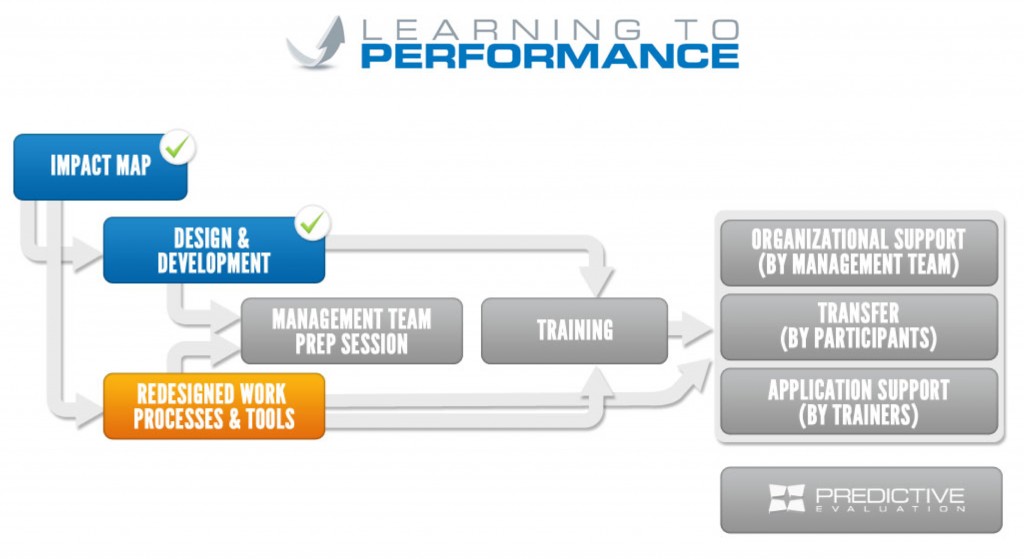
Before I discuss the specifics, let’s talk about a real case where this was applied. One of my clients had five task teams operating inconsistently with respect to Project Management (PM). While these teams were tightly aligned to the company’s overall business strategy , they were each operating in a vacuum, with no commonality. The company needed to implement basic project management across all teams, striving to institutionalize common PM processes, methods and templates.
The client and I discussed that implementing project management training without redesigning the project management process, tools, and templates would result in little transfer . Therefore, simultaneously with instructional design and development, I created the firm’s new standard project management process, developed five standard PM templates, and identified the on-line PM system the company would use. These were approved by the executive team and the training was designed to totally support the project management initiative.
This shows the potential power of integrating process/tool redesign with instruction design. See below on the steps I use in this phase.

While there are many process redesign models , I prefer to use this simple model:
Step 1: As part of my instructional needs analysis and environmental scan I identify any process, tools, or systems that may be possible redesign candidates and present them to the client for consideration and move forward with redesign. Note: at times, the reward and recognition practices need to be examined to ensure use of new training skills is supported. The client may say no to redesign but should know the consequences to post-training transfer and performance.
Step 2: If the client chooses redesign, then the processes are mapped as-is. Note: if you are not qualified for this effort, then engage a process-mapping expert on content and exercises that the instructional design will need to address.The first step is to identify roles within the process.
- Identify process steps needed to complete the work.
- Identify information passed from step to step within the process.
- Identify decision points within the process that could change direction or require additional steps.
- Document the process flow by creating a diagram showing each step, the role that performs the step, and information flowing from step to step.
Step 3: Using the as-is process and the Impact Map , you next design the to-be process all along noting content and tasks that training will need to address. I use an iterative adaptation of the fishbone or Ishikawa diagram commonly used for root cause analysis. Essentially the use of the fishbone is expanded to not only determine root cause, but also to identify improvement opportunities.
The iterative adaptation is described below.

Primary Users
- Are job descriptions correct? Do they need updating?
- How are the skills, knowledge, and beliefs from the Impact Map addressed with the users? How will training aid in the new process?
- Are the business decisions assigned to users at the appropriate organization level?
- Is the primary user inhibited due to the work environment?
Management Control
- What levels of management control are used within the new process?
Workflow Tasks
- What tasks are needed to perform the process?
- How are they different?
- What is the work process flow?
System Interaction
- What systems will the users employ to do the work?
- Does a system currently exist that is sufficient?
- What system changes will be needed?
Information Flow
- What information is needed to accomplish each task?
- Is information stored appropriately per company requirements?
- Are there opportunities to gain efficiencies by automating?
- Are there possibilities of implementing new or enhanced tools to the primary user?
- Are adequate leading metrics established within the process to allow the process owner to investigate task performance in order to affect final results?
- Are adequate lagging metrics established at the end of the process to allow for trend analysis of the final result?
Business Decisions
- Are the current business decisions based on valid business rules?
- Can business rules be changed to allow opportunities for efficiencies?
Step 4: While the course is being defined, the new/enhanced process and/or tools are tested and implemented.
By doing this activity you greatly enhance the likelihood of what you train being successfully transfer to the job.
As always, I look forward to your thoughts on this approach.
The third step in the Learning to Performance System is to begin instructional design and course development . The output of the second step, the Impact Map , is considered for this activity. The purpose of this task is to take the first column of the map and seamlessly turn it into training .
I use the ADDIE model for my design and development efforts . The ADDIE Model is a generic term for the five-phase instructional design model consisting of Analysis, Design, Development, Implementation, and Evaluation. Each step has an outcome that feeds into the next step in the sequence.
The first step in my
Learning to Performance system
is to create an Impact Map for the proposed
training
course or curriculum. Today’s competitive advantage goes to those who can learn and adapt faster. High Impact Learning integrates learning, leadership and change management competencies to produce documented, sustainable results and ensures courses are linked to business
results
. The Impact Map is a proven method for rapidly
identifying training needs
, evaluating options, and quickly prototyping innovative solutions. Its power lies in providing a clear line of sight linking the content of the training through to the outcomes desired by management. It is therefore indispensable to the instructional designer as well as those tasked with delivering the training.
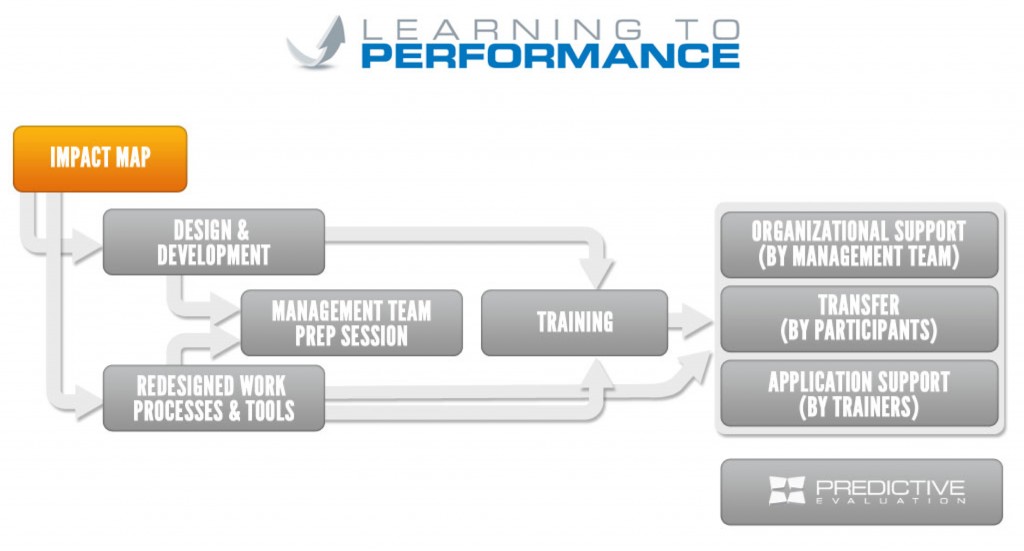
Often, companies diagnose a performance gap, requiring training as the solution. Isolated training events that don’t take a “complete training approach” produce less results (value to the business) than a more comprehensive, integrated approach. Complete training combines learning, leadership and change management competencies to produce documented, sustainable results and value. With all my custom training solutions , I use this approach, which I call the Learning to Performance System :